
Download Collanos Workplace – Secure Project Management Tool for Teams
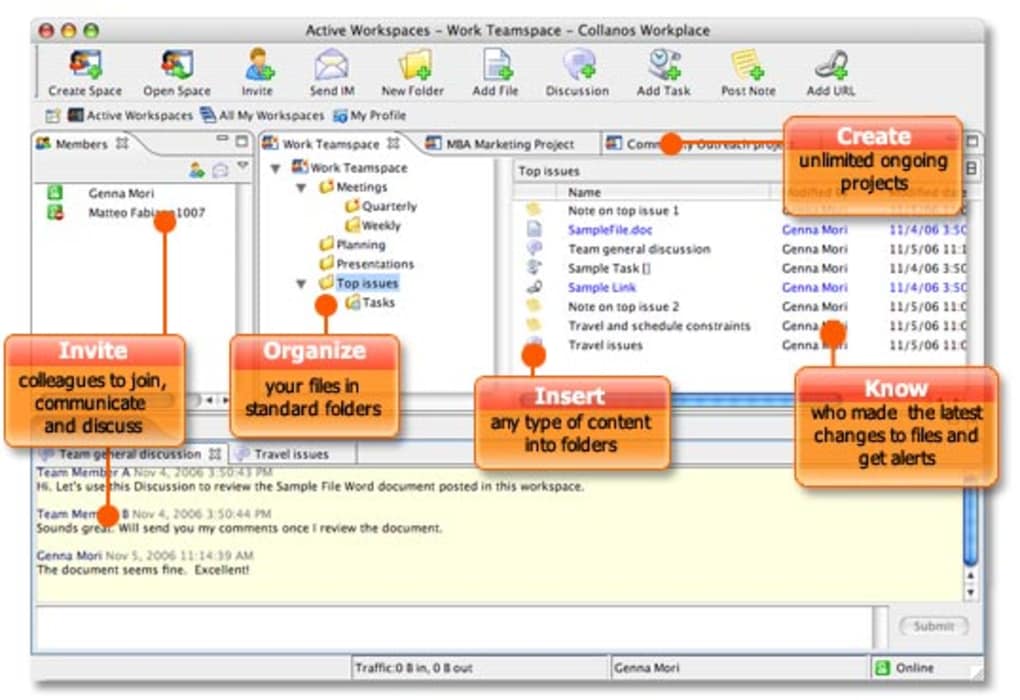
In today’s fast‑paced work environment, the ability to keep every piece of project information in one place can make the difference between meeting a deadline and scrambling at the last minute. Collanos Workplace answers that need with a clean, tab‑based interface that brings emails, reports, graphs, and even chat conversations under a single roof. Designed for small‑to‑medium teams that value transparency, the app updates changes in real time, shows team‑member availability, and works offline as well as online.
Whether you’re on Windows, macOS, or Linux, Collanos Workplace lets you create multiple “workplaces” – essentially project workspaces – that stay synchronized across all devices. The tool’s closed‑environment design helps keep data within the organization, while its built‑in instant messenger encourages quick clarification without leaving the application. Although the platform can feel a little slower during heavy sync periods and lacks granular security settings, its overall simplicity and cross‑platform reach make it a compelling choice for teams that want a single, intuitive hub for project collaboration.
Core Features that Keep Projects on Track
- Tabbed Workspaces: Create separate tabs for each project, allowing you to switch instantly without losing context.
- Unified Content Repository: Store emails, PDFs, spreadsheets, images, and other files directly inside the workspace for instant retrieval.
- Real‑Time Sync: Changes made by any team member appear instantly on all devices, reducing version‑control headaches.
- Team Availability Indicator: See at a glance who is online, offline, or busy, helping you choose the right moment to start a discussion.
- Integrated Instant Messenger: The discussion pane at the bottom lets you chat, share quick screenshots, or drop a link without opening a separate app.
- Offline Mode: Work without an internet connection; the software automatically syncs new data once you reconnect.
- Cross‑Platform Support: Native clients for Windows, macOS, and Linux ensure consistent experience across the whole team.
- Simple Permission Model: Assign view or edit rights per workspace, keeping sensitive data visible only to authorized members.
Each of these features has been built with usability in mind. For example, the tabbed workspaces mimic the familiar browser experience, reducing the learning curve for new users. The unified content repository eliminates the need to hunt through endless email threads for the latest version of a document. Real‑time sync, powered by Collanos’ proprietary delta‑compression algorithm, ensures that bandwidth consumption stays low even when large files are involved. Together, these capabilities create a workflow that feels natural, yet powerful enough to handle complex, multi‑department projects.
Installation, Setup & Daily Use – A Step‑by‑Step Guide
Getting started with Collanos Workplace is straightforward, whether you prefer a graphical installer or a package manager. Below is a concise walkthrough for each supported operating system.
Windows Installation
- Download the
.exeinstaller from the official Collanos website. - Run the installer and follow the on‑screen prompts – the wizard automatically detects the best installation folder.
- After installation, launch the app and sign in with your corporate credentials.
- The first run will ask you to create a default workspace; you can also import existing project data from CSV or JSON files.
macOS Installation
- Grab the
.dmgfile from the download page. - Drag the Collanos Workplace icon into your Applications folder.
- Open the app, grant the necessary permissions for file system access, and log in.
- Use the “Import Workspace” button to bring in legacy project structures.
Linux Installation
- Choose the appropriate package format:
.debfor Debian/Ubuntu or.rpmfor Fedora/Red Hat. - Install via your package manager, e.g.,
sudo dpkg -i collanos-workplace.deborsudo rpm -i collanos-workplace.rpm. - Run
collanos-workplacefrom the terminal or the desktop shortcut. - Log in and configure your first workspace using the built‑in wizard.
Once the application is up and running, daily use follows a predictable pattern. Create a new tab for each project, drag and drop files into the workspace, and use the discussion pane for quick questions. The “Sync Now” button forces an immediate upload if you are working offline, while the status bar at the bottom of the window displays connection health and recent activity logs. Because Collanos Workplace stores data locally until a connection is available, you can keep working even on a train or in a coffee shop without sacrificing security.
Compatibility, Pros & Cons – What to Expect on Different Platforms
Collanos Workplace is officially supported on Windows 10/11, macOS 12 Monterey and later, as well as major Linux distributions such as Ubuntu 20.04+, Fedora 34+, and Debian 10+. The application runs natively on each OS, taking advantage of platform‑specific UI conventions (e.g., native menus on macOS, task‑bar integration on Windows, and system tray icons on Linux). No additional virtual machines or compatibility layers are required.
Pros
- Unified Workspace: All project assets are stored together, reducing context switching.
- Cross‑Platform Consistency: The same feature set and UI are available on Windows, macOS, and Linux.
- Real‑Time Collaboration: Team members see updates instantly, which speeds up decision‑making.
- Offline Capability: Work uninterrupted without internet, with automatic sync on reconnection.
- Integrated Messaging: No need for a separate chat tool; quick questions stay within the project view.
- Simple Permission Controls: Easy to assign view or edit rights per workspace.
Cons
- Performance Under Heavy Load: Large file syncs can cause temporary UI lag.
- Limited Security Settings: The app lacks granular encryption options and advanced audit logs.
- All‑In‑One Approach: Users must adapt to every built‑in feature, even if some are rarely used.
- Startup Login Delay: Initial authentication can take a few seconds on slower networks.
- No Mobile Apps Yet: Collaboration is limited to desktop environments for now.
Frequently Asked Questions (FAQ)
Can Collanos Workplace be used without an internet connection?
Yes. The software includes a robust offline mode that stores all changes locally. When you reconnect to the internet, Collanos automatically syncs new files, comments, and status updates with the server and with other team members.
Is there a limit to the size of files I can upload?
The default upload limit is 2 GB per file, which is sufficient for most business documents and high‑resolution images. Administrators can increase this limit in the server configuration if larger media assets are needed.
How does Collanos Workplace protect my data?
All data transmitted between the client and server is encrypted using TLS 1.3. Files stored on the server are encrypted at rest with AES‑256. While the desktop client does not currently offer end‑to‑end encryption or granular permission policies, the closed environment helps keep information within the organization.
Can I integrate Collanos Workplace with other tools like Slack or Jira?
At present, Collanos offers a basic API that lets developers push notifications to external services. Native integrations for Slack, Jira, or Microsoft Teams are on the roadmap, but you can already set up webhooks to trigger alerts in those platforms.
Is there a free trial or a free tier available?
Collanos Workplace provides a 14‑day free trial with full feature access. After the trial, you can choose a subscription plan that best fits your team size. A limited free tier for up to three users is also offered, though it restricts storage to 5 GB.
Conclusion – Should You Download Collanos Workplace?
Collanos Workplace delivers a cohesive, cross‑platform environment that brings project files, real‑time updates, and instant messaging into a single application. Its tabbed workspaces make it easy to separate initiatives while still providing a bird’s‑eye view of the entire portfolio. For teams that value a secure, offline‑first approach and are comfortable using a unified tool, the software represents a solid investment. The primary drawbacks—occasional UI lag during heavy syncs and a lack of advanced security controls—are outweighed by the convenience of having everything in one place, especially for small to medium‑sized organizations.
If you’re ready to streamline collaboration, reduce email clutter, and keep your project assets safely organized, click the button below to start your free trial. The download is quick, the installation painless, and you’ll have a fully functional workspace ready within minutes.
Download Collanos Workplace NowCollanos Workplace earns a solid 4.2 out of 5 for its intuitive design, real‑time sync, and robust cross‑platform support. While performance dips under heavy file loads and security options could be deeper, the overall experience is smooth enough for daily use across diverse teams. Its integrated chat keeps conversations contextual, and the offline mode guarantees productivity even without constant internet access.
Pros
- All‑in‑one project hub
- Works on Windows, macOS, and Linux
- Offline editing with automatic sync
- Real‑time collaboration
Cons
- Occasional UI lag with large files
- Limited granular security controls
- No native mobile apps yet







